
Charting is critical to futures traders who rely on an assortment of visual and technical tools to help them analyze and trade the markets.
Oftentimes, traders rely on their own platform’s charting capabilities. This serves a practical purpose. You don’t want to encumber your charting dashboard with extra tools and windows that will take away from the quick-reaction demands of real-time trading.
But when you’re in analysis mode, it helps to have a large menu of tools, functions, reports, and perspectives to guide you along. And this is why we’re introducing the TradingView charts as a tool that might be helpful to your work on market analysis and trading.
TradingView is an advanced financial visualization platform that offers a wide array of chart formats, instruments, technical tools, media reports, and social trading functions.
You can customize your TradingView dashboard to match your preferences for market analysis. And this is what we’re going to focus on in this guide—namely, how to navigate and customize your platform.
Take a look at the dashboard below.
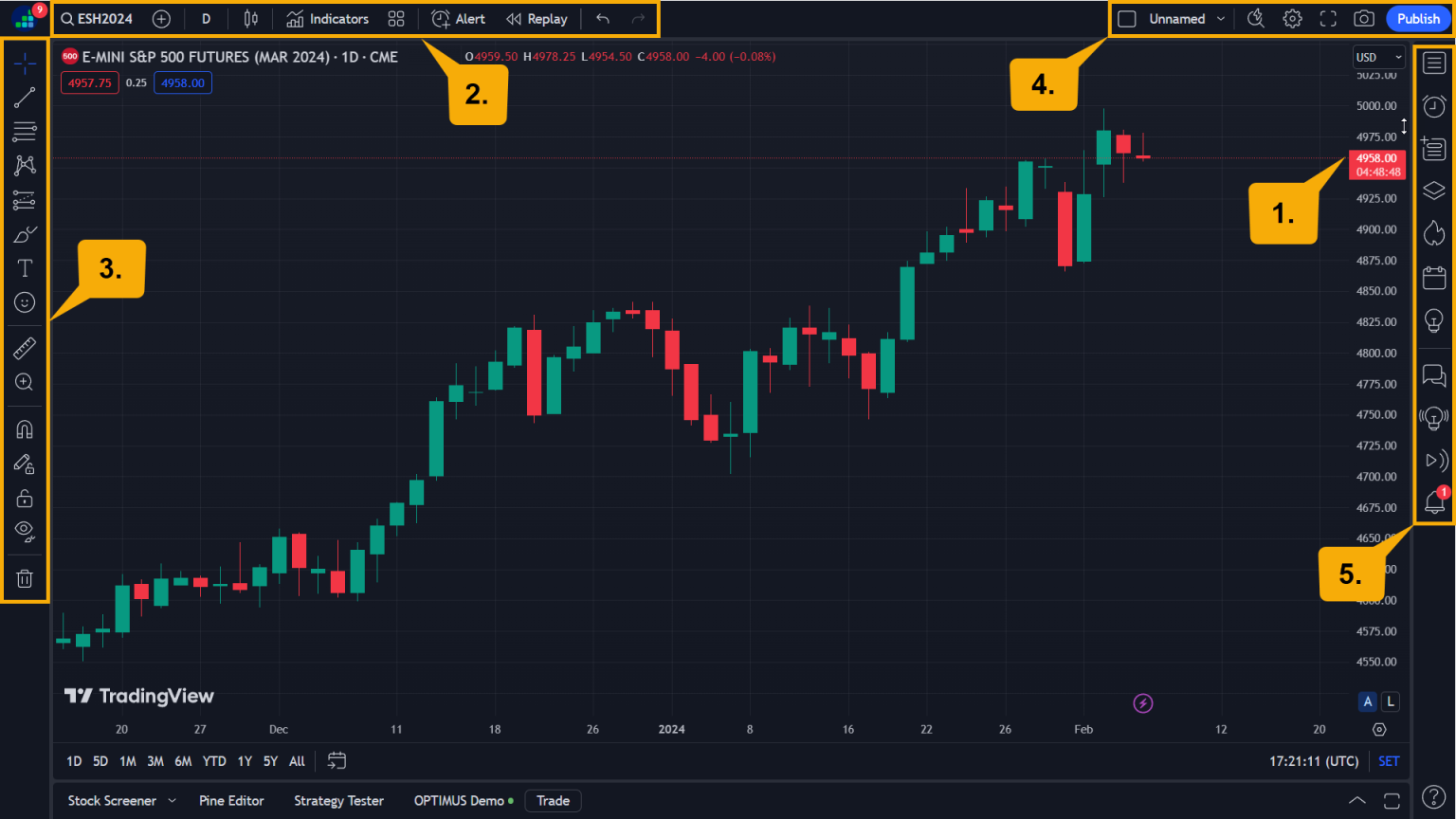
If you take a look at your dashboard, it will be obvious that our chart above doesn’t cover everything in TradingView. There’s much more to discover and it’s best to approach it from a hands-on perspective.
However, this general overview should help you get started.
It really depends on what you need most at the moment. Click on any of the topics below to go straight to the tutorial.
BUT REMEMBER, THE BEST WAY TO LEARN IS TO DO. Our description and tips may be comprehensive but they’re by no means exhaustive. Plus, you don’t want to spend your day reading how to use these indicators when you can just jump in and try them yourselves.
So here are the basics. Go forth and explore TradingView’s platform!

Creating your overall dashboard profile is like preparing the overall context for your analysis and trading.
For example, let’s suppose you trade micro futures for the big three US stock indices. You might want to call your layout “Micro Indicies,” combining the following instruments:
So, when you load the profile “Micro Indices,” you’ll pull up all the charts you used for MYM, MES, and MNQ.
Remember: each profile is a collection of individual charts. Using the profile function, you can then see different views depending on how you set your chart templates.

A chart template is essentially how you want your charts and dashboard to be set up every time you open your platform. Namely, you want your charts layout to be fixed in a certain style, and you want certain instruments to be accessible with a click.
Here’s a tip: TradingView will save your layouts and remember the indicators and charting tools you’ve applied to your charts.

The top menu has a variety of handy functions that you might find yourself using on a regular basis.
This search field allows you to select the instruments you want to view. Note that wide range of different financial asset classes available to you once you click on the menu.

If you have an upgraded subscribership, you have extended features as shown in the image below.

This feature allows you to switch your chart’s time scale, from a monthly view down to one second. Note that TradingView’s time frame features offer a greater range of choices than most trading platform charts.

Do you want to view a line, candlesticks, renkos or kagis? By clicking on the candlestick symbol at the top, you can change to any of the available chart types. As you can see, TradingView charts are quite wide-ranging, from regular bars and candlesticks to more esoteric types such as Renko, Point and Figure, and even Kagi charts.

Chart settings may appear at the top-left or the top-right navigation bar depending on the version you’re using. As you can see in the image below, there are several setting options that you can use to customize the look of your chart.

Note that you can also change TradingView’s Timezone to match your preference.
This can come in handy when you’re trying to compare two or more markets. In the example below, I am comparing the Micro e-mini S&P 500 futures (MES) with the micro Dow Jones (MYM), and the micro Nasdaq (MNQ) on a year-to-date basis.
What’s great about this feature is that TradingView’s range of financial categories gives you a wide range of comparisons, from intra-market overlays to inter-category overlays (like MNQ and 10-Year US Treasury Yields).

This function allows you to do pretty much what it says: set a price alert. Here are the options available to you once you click on the price alert symbol.


The first symbol on the left-hand navigation gives you an array of lines to place on your chart: trendlines, arrows, rays, channels, etc.

This is what to click on to find all of your Fibonacci tools plus your pitchforks and Gann tools. Basically, this is what you use for most of your retracement and projection work.
If you need to notate your chart with circles, rectangles, triangles, or any other shape, this tool will give you plenty of options.

Part of the notation process involves texts, arrows, flags, and text windows.

Not everyone is an Elliottician or a wave cycle theorist, but for those who are, this tool gives them plenty of flexibility to measure price and time cycles depending on their preferred approach.

There are a number of common to esoteric approaches to measuring market activity. This tool provides several functionalities that are typically not present in most trading platforms.

This should come in handy for content creators who need to punctuate ideas with an assortment of graphics and icons.


Next to charts themselves, indicators play a critical function in technical analysis and trading. TradingView has a massive range of standard and custom indicators.
To access the indicator window, just click on “Indicators” in the top menu.
A new popup opens and on the left, you can see the different categories: “Built-Ins” are your standard indicators such as the Bollinger Bands, MACD, RSI, etc.,

Financials will provide data on individual companies and is more suitable for those trading equities rather. Futures traders may find little to no use for this window, Still, it’s a cool feature.
Community Scripts features custom indicators developed by TradingView users. Here’s a tip: if you’re looking for a custom indicator, you might want to go with the Editors’ picks or Top to ensure that the indicator you are using has a history of adoption, is highly rated, and likely has few to no bugs. But to discover new or popular user-developed indicators, check out what’s Trending.

Just as you can customize your chart style, you can also customize the settings for your indicators and your combination of indicators.